
Business Email Security, DMARC, and Account Protection

Professional verifying multi-factor device authentication beside an open laptop.

Setting up SPF and DMARC has long been standard advice for business email. On its own, though, DNS authentication will not stop an attacker who steals an active Microsoft 365 session cookie or tricks a vendor into emailing forged wire instructions from a lookalike domain. Protecting business email means tightening sender DNS, sign-in controls, OAuth permissions, and mailbox auditing together—staged carefully so legitimate mail keeps arriving.

Staged DMARC enforcement Microsoft 365 & Workspace FIDO2 & passkey MFA OAuth & forwarding controls

Where Default Microsoft 365 and Workspace Tenants Fall Short

Out of the box, Microsoft 365 and Google Workspace are tuned so a new company can send mail in ten minutes without breaking anything. That convenience leaves doors open. Without aligned DKIM keys and an enforced DMARC policy, anyone on the internet can send an invoice carrying your exact domain header. Meanwhile, adversary-in-the-middle phishing pages routinely capture live browser session tokens right past six-digit authenticator codes and push prompts.

Maybe the question isn't just whether MFA is turned on, then, but what kind of MFA protects the people who can approve wires or create admin accounts? Before changing a single rule, we inventory every legitimate sender and sign-in path. You can test your current DNS syntax anytime with our DMARC and SPF record builder or walk through the details in our DMARC setup guide.

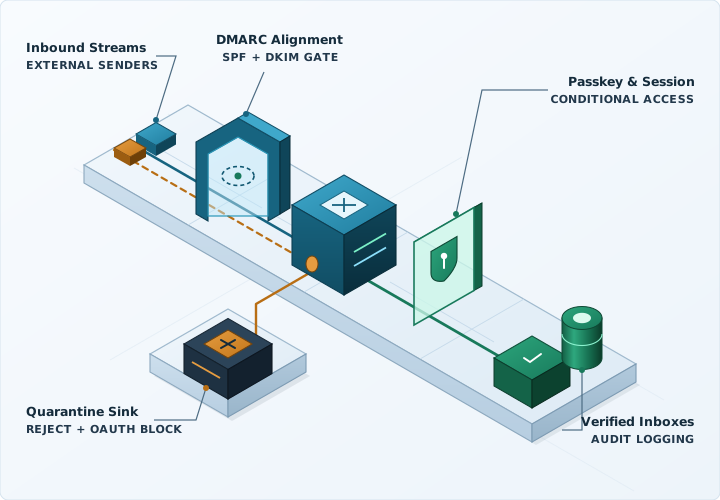
Isometric email security architecture showing SPF, DKIM, and DMARC verification rings, spoofed sender quarantine, and verified mailbox delivery.

Moving to DMARC Enforcement Without Dropping Legitimate Mail

Flipping a live domain straight to p=reject on a Friday afternoon is a fast way to block your own payroll notices, CRM quotes, or accounting invoices. So, how do you get to strict enforcement safely? Well, you watch real traffic first and tighten policy in measured steps.

First

Sender Inventory (p=none)

Publish a monitoring DMARC record and read aggregate XML reports over several weeks until every cloud sender, mail relay, and scanner using your domain is accounted for.

Second

DKIM Keys & SPF Cleanup

Turn on 2048-bit DKIM signing across Exchange Online, Google Workspace, CRM, and billing tools, trim SPF lookups comfortably below the 10-lookup ceiling, and split bulk mail onto subdomains.

Third

Staged Quarantine Ramp

Move policy to p=quarantine in controlled percentages while checking reports with your team to confirm customer correspondence and automated notices pass alignment.

Fourth

p=reject & Parked Domains

Enforce p=reject on your primary domain, lock unused or defensive domains with null MX and strict SPF/DMARC records, and keep an eye on alignment reports when new tools launch.

Identity, Tenant, and Mail-Flow Controls We Configure

Session protection

Phishing-Resistant MFA & Conditional Access

Spam filters cannot help once an attacker replays a stolen browser session cookie. For administrators, executives, and finance staff, we roll out FIDO2 security keys or device-bound passkeys paired with Conditional Access checks and separate non-mail admin accounts.

Read the MFA deployment guide
Tenant hygiene

OAuth App Lockdown & Forwarding Blocks

In a mailbox compromise, it is not unheard of for an attacker to grant a rogue OAuth app mail-read access or add a quiet forwarding rule into Archive or RSS Feeds so they stay inside even after a password reset. We block unapproved third-party OAuth consent, stop external auto-forwarding, and audit mailbox delegates.

Open the access review worksheet
Licensing & workflows

Using the Licenses You Already Own First

Before suggesting another add-on subscription, we configure the executive anti-impersonation, cousin-domain warnings, Safe Links, and attachment policies already included in Microsoft 365 Business Premium, E3/E5, or Workspace—paired with practical call-back habits for bank changes.

Explore employee security training
Incident containment

Compromised Mailbox Triage & Log Review

Changing a password alone leaves active refresh tokens and newly registered MFA devices working. When an account is suspect, we revoke sessions, clear persistence rules and OAuth grants, and trace unified audit logs to see what was accessed. Existing clients should use their support line; new callers can reach us at 1-888-907-3637 during Eastern business hours.

Read the compromised account checklist

Questions About Business Email Security

Why did our SPF record break after we added another SaaS tool?

SPF enforces a hard ceiling of 10 DNS-querying lookups across include, a, mx, and redirect mechanisms. Once marketing tools, CRM senders, help desks, and payroll services push that count past 10, receiving mail servers return a permanent error. Rather than relying on brittle SPF-flattening scripts, we move separate mail streams onto dedicated subdomains and align 2048-bit DKIM signing.

How long does moving from no DMARC record to a reject policy take?

For one primary domain with a handful of known cloud senders, watching aggregate reports and stepping cleanly to p=reject usually takes four to six weeks. Organizations with older ERP relays, multifunction copiers, or several regional domains often run a slightly longer observation window first so real invoices and alerts never get dropped.

Do we need to buy a separate third-party email security gateway?

Often you do not. Microsoft Defender for Office 365 or native Google Workspace controls—when actually turned on and paired with Conditional Access, phishing-resistant MFA, OAuth consent limits, and enforced DMARC—close the most common compromise paths using licenses you may already pay for. Where specialized archiving or encryption is genuinely warranted, we evaluate third-party gateways openly.

What does domain authentication stop, and what still requires account controls?

SPF, DKIM, and DMARC stop outsiders from forging your exact domain in the From header, and they improve inbox placement for your real mail. They do nothing against lookalike cousin domains, hijacked vendor mailboxes, or stolen session cookies—which is why DNS enforcement needs FIDO2 MFA, impersonation rules, and out-of-band wire verification alongside it.

Can we hire briskData for email hardening as a standalone project?

Yes. We run DMARC enforcement and Microsoft 365 or Google Workspace hardening either as a fixed-scope engineering project with full admin documentation, or as part of ongoing managed IT.

Request a Business Email Security Review

Share your primary sending domain, whether you run Microsoft 365 or Google Workspace, rough mailbox count, and whether you are planning preventative hardening or looking into a suspect sign-in.

  • Staged SPF, DKIM, and DMARC rollout checked against your actual senders
  • Defender or Workspace anti-impersonation, OAuth consent limits, and FIDO2 MFA
  • Available as a standalone fixed-scope project or ongoing managed support

Dealing with an active mailbox incident during Eastern business hours? Call 1-888-907-3637 directly.

Request a Business Email Security Review

An NDA is available before you share sensitive details. You can request one in your message.

Your message goes directly to an engineer.

Privacy policy · No passwords or sensitive files, please.