
Disaster Recovery Architecture, Runbooks, and Failover Drills

Systems engineer verifying recovery runbooks on a laptop between server racks.

Keeping backup files in an isolated vault solves data survival. Bringing the business back online within an agreed window is a separate job. We design standby environments, write operational runbooks, and run fenced failover drills so your team knows how databases, identity, DNS, and external integrations recover when a primary region or facility goes down.

RTO & RPO architecture Cloud & hybrid standby Isolated failover drills Documented test reports

Matching Recovery Architecture to Real Outage Impact

Written disaster recovery plans tend to look reassuring in a binder and stall twenty minutes into a real outage. Why? Usually because the plan stops at restoring a database snapshot. Bringing up a fresh PostgreSQL or SQL Server volume in a secondary cloud region does not get users signed back in if KMS encryption keys were locked to one region, container registries or Terraform state sat inside the failed zone, TLS certificates fail validation, or partner webhooks still point at unreachable static IPs.

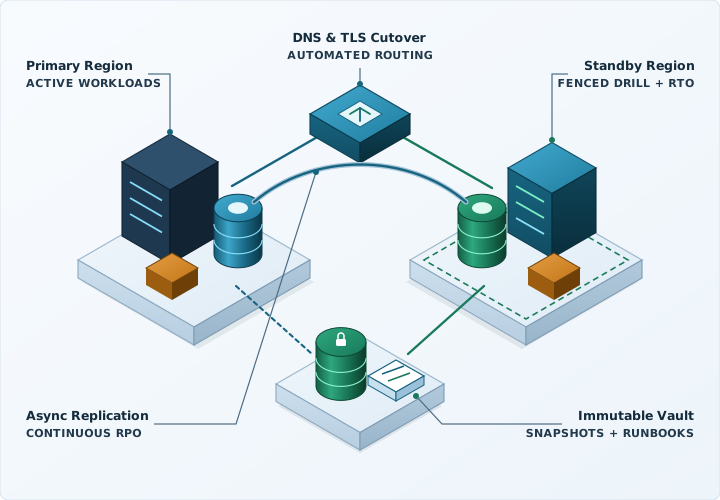
Maybe the better place to start isn't choosing a cloud tier, but tracing every quiet dependency an application leans on to finish a real transaction. Once identity, DNS, secrets, databases, and external callbacks are mapped out, we size cloud or hybrid standby environments around the outage window your business can realistically absorb—without paying active-active bills for internal tools that can wait until afternoon. You can model downtime tolerance in our RTO and RPO calculator and check governance structure in our IT disaster recovery plan guide.

Isometric disaster recovery topology showing primary zone replication, automated DNS failover routing, warm-standby compute, and isolated immutable snapshot vaults.

Comparing Backup Restore and Standby Failover Tiers

Shorter Recovery Time Objectives (RTO) and Recovery Point Objectives (RPO) cost more to keep running every month. The ranges below are illustrative reference patterns; only an actual timed exercise tells you where your workload lands.

Recovery PatternIllustrative RTOIllustrative RPOHow Failover Works & Standby Footprint
Cross-Region Backup & Restore
Internal apps, reporting, archives
4 to 12 hours 1 to 24 hours Immutable offsite snapshots and log archives; compute provisioned via IaC when declared. Minimal ongoing standby compute.
Pilot Light Standby
Core ERP, line-of-business SaaS
30 to 90 minutes Seconds to 5 minutes Continuous asynchronous database replication into a small warm target; pre-built application images scale out on cutover.
Warm Standby Environment
Customer portals, multi-store operations
5 to 20 minutes Under 1 minute Scaled-down application nodes, caches, and database replicas run continuously in a secondary region ready for DNS traffic shift.
Multi-AZ / Active-Active
Payment gateways, high-volume APIs
Under 1 minute Near-zero (sync quorum) Synchronous writes across Availability Zones with stateless load-balanced nodes and automated health-check routing.

Deliverables That Turn a Policy Document Into Working Recovery

Objectives & scope

Dependency Mapping & Tier Sizing

Paying active-active cloud bills for a back-office reporting tool makes very little sense. Together with your leadership team, we separate critical workloads from deferrable ones, track down single points of failure across DNS, KMS keys, and identity, and pair standby design with immutable backups.

Open the RTO/RPO calculator
Execution

Step-by-Step Operational Runbooks

Nobody does their best architectural improvisation at 3 a.m. during a regional outage. We write and maintain plain runbooks with exact promotion commands, credentials stored outside the impaired region, clear authority on who declares failover, and steps to return to normal operations.

Read the DR runbook guide
Verification

Isolated Drills & Audit Reports

SOC 2 auditors, PCI DSS Requirement 12.10 assessors, HIPAA contingency reviewers, and cyber-insurance underwriters ask when recovery was last tested, not merely when a policy was signed. Each exercise produces a dated engineering report recording observed timings, checks, and follow-up fixes.

Generate a DR test plan

How an Isolated Failover Exercise Runs

It is not unheard of for teams to postpone recovery testing all year for fear of double-charging credit cards or breaking Monday morning operations. Fenced test networks solve that. Live traffic stays untouched.

First

Fence the Test Network

Spin up an isolated VPC or VLAN with outbound firewall rules blocking accidental calls to live payment processors, SMTP relays, and external webhooks.

Second

Promote Replicas & Secrets

Restore immutable snapshots or promote a detached database replica, mount multi-region secrets, and boot application nodes strictly from the written runbook—noting anywhere an engineer has to improvise.

Third

Verify Real Workflows

Check TLS certificates via split-horizon DNS, sign in through your identity provider, validate recent transaction records, and measure elapsed RTO and RPO on the clock.

Fourth

Document & Remediate

Log timestamps, verification outputs, and any configuration drift uncovered during the drill, assign follow-up fixes, and tear down temporary test compute cleanly.

Questions About Disaster Recovery Services

How does disaster recovery differ from managed backup services?

Managed backups keep clean, isolated copies of your databases, files, and virtual machines safe from hardware failure or stolen credentials. Disaster recovery covers everything else required to serve customers again within an agreed target window: standby compute, network routing, DNS cutover, TLS certificates, secrets access, and step-by-step runbooks your team has actually practiced.

Will running a recovery drill interrupt live customer traffic or payments?

Not unless you specifically ask for a live cutover test. Standard recovery exercises boot restored servers and databases inside a fenced network that blocks outbound connections to payment gateways, customer email relays, and partner webhooks while we verify sign-in and core application workflows.

Can we replicate local VMware or Hyper-V servers to the cloud without moving daily work?

Yes. A hybrid Pilot Light design leaves daily ERP, SQL Server, or file workloads on your local hardware for LAN speed while replicating encrypted changes into an AWS or Azure landing zone. During normal operations you pay mainly for storage and lightweight replication, spinning up full cloud compute only during drills or a declared outage.

How often should we run a disaster recovery exercise?

Test frequency depends on how quickly your stack changes and what customer contracts, SOC 2, PCI DSS, HIPAA, or cyber-insurance renewals require. Most clients verify automated backup restores monthly and run functional application failover exercises once or twice a year, plus after major architecture changes.

Discuss Your Disaster Recovery Requirements

Share your primary hosting setup, core databases, target recovery timeframe if defined, and any upcoming audit or insurance renewal.

  • Dependency mapping across databases, identity, DNS, TLS, and external APIs
  • Cloud and hybrid standby architectures matched to your real outage impact
  • Isolated recovery exercises with documented timings and follow-up fixes

For SaaS platforms, payment systems, healthcare, financial, and multi-site businesses planning or testing application recovery.

Discuss Your Disaster Recovery Requirements

An NDA is available before you share sensitive details. You can request one in your message.

Your message goes directly to an engineer.

Privacy policy · No passwords or sensitive files, please.