
Business Email Migration for Microsoft 365 and Google Workspace

Employee verifying smartphone account access beside a laptop and tablet.

Moving company email looks simple until an overlooked alias drops customer replies, an office scanner stops sending PDFs, or twenty phones fail sign-in on Monday morning. We plan and carry out Microsoft 365 and Google Workspace migrations nationwide, covering mailbox history, shared access, DNS authentication, and staff setup after cutover.

Microsoft 365 Google Workspace Mailbox migration Staff support

Email Accounts and the Services Connected to Them

Copying messages from one inbox to another is rarely the hardest part of a business email move. What usually trips teams up are the connections nobody has documented in years: who holds the domain registrar login, which website inquiry forms or billing apps send mail through an old SMTP relay, and how shared addresses like accounting@ or info@ are delegated across staff.

So where do you start? Before picking a cutover weekend, we verify registrar and tenant access and check what your current provider exports cleanly—and where platform limits exist around local Outlook archives, calendar permissions, or chat history—so nobody discovers a surprise halfway through the move.

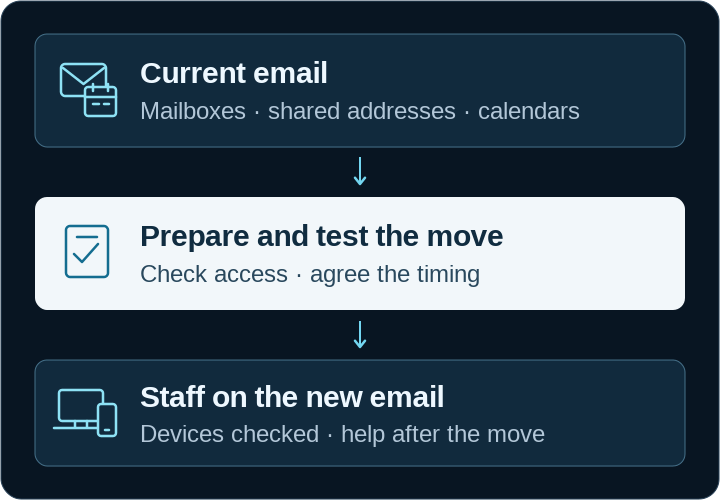
An email move progresses from the current accounts through preparation and testing to staff using the new service.

Email Provider and Tenant Migrations

Microsoft 365 Migrations

Moving from hosted Exchange, reseller-locked Microsoft tenants, legacy IMAP hosts, or Google Workspace into a clean Microsoft 365 tenant. We pre-stage mail history, configure shared mailboxes and aliases, and help staff reconnect Outlook and mobile devices.

Google Workspace Migrations

Setting up Workspace accounts, groups, and DNS authentication while transferring supported mail and calendar history. Because Outlook rules, folder habits, and delegation behave differently in Gmail, we clarify up front what converts automatically and what gets recreated.

Business Account Transitions

Handling Microsoft 365 tenant-to-tenant moves and platform switches between Workspace and Microsoft 365 after a rebrand, acquisition, or business split, including domain release windows, identities, shared drives, and admin handover.

Preparation, Migration, and Staff Support

Repointing MX records without running a pilot transfer first is asking for avoidable Monday downtime. Before touching live mail routing, we agree in writing on which accounts and archives are moving, how cutover timing works, and how long post-move staff support stays open. Shared files, chat threads, team calendars, and compliance archives often follow separate transfer steps alongside user mailboxes.

We can also bundle Microsoft 365 and Google Workspace licensing and ongoing account and device support if you want one team handling the tenant afterward.

A colleague pointing something out on an office computer screen.

Mailboxes and Shared Resources

Inventory active user accounts, departed-employee archives, aliases, shared mailboxes, distribution lists, and shared calendars so everyone agrees early on what moves and what can be archived.

Domain Access and Connected Services

Confirm DNS registrar and tenant admin access ahead of time, then update MX routing, SPF, DKIM, and DMARC alongside the mail relays used by website forms, copiers, and invoicing software.

Timing, Testing, and Recovery

Run pilot transfers on representative mailboxes before cutover and verify inbound, outbound, and internal delivery afterward. The old mail environment stays accessible until checks pass, with rollback steps ready if needed.

Staff Access After the Move

Walk employees through sign-in, multi-factor authentication, fresh Outlook profiles, phone mail apps, and shared mailbox access, then hand over plain documentation of the finished tenant setup.

Questions About Moving Business Email

Can we keep our current email addresses?

Usually, provided your business controls the domain name. Registrar ownership, current administrator access, and any reseller lock-in determine how cleanly existing addresses move.

Will all our old mail, calendars, and files move?

What transfers cleanly depends on both the source and destination platforms. A mailbox migration does not automatically carry over every cloud drive permission, chat thread, or client rule, so we spell out platform limits in the proposal before work begins.

Do we need a monthly IT agreement?

No. Email migration is available as a standalone, defined project with an agreed post-cutover support window. Ongoing managed IT and consolidated license billing are there if you want us to keep looking after the tenant afterward.

Can you help with a migration that has already started?

Yes. Stepping in mid-move to untangle missing mail, split delivery failures, sign-in loops, or broken shared mailboxes is not uncommon. If your mail provider is staying the same and you mainly need troubleshooting, our business email support is often the better starting point.

Where do you provide migration services?

We run migrations remotely for organizations throughout Maryland and across the United States, scheduling cutovers around your business hours, time zones, and any hands-on site support needed.

How much does an email migration cost?

Mailbox count is only part of the math. Archive sizes, the source platform, shared mailboxes, domain changes, pilot testing, and how much hands-on device help staff need all shape the effort. We separate migration labor, licensing, and any third-party tool costs clearly before you commit.

Tell Us About Your Email Move

Share your current provider, approximate account count, destination if known, and any deadline. An engineer will respond within one business day.

  • Mailboxes and shared resources reviewed before the move
  • A defined migration scope and staff support period
  • Licensing and ongoing administration available

Supporting Microsoft 365, Google Workspace, hosted Exchange, and legacy IMAP migrations nationwide.

Tell Us About Your Email Move

An NDA is available before you share sensitive details. You can request one in your message.

Your message goes directly to an engineer.

Privacy policy · No passwords or sensitive files, please.