
A production change plan records the risks, rollback conditions, approvals, and communication steps before a rollout begins. Use this template and worked example to prepare those decisions for your own change.
When to Use a Change Plan vs a Runbook
Runbooks document how to operate or recover a service. A change plan records the decision to proceed and the conditions for stopping or reversing the change. Use a change plan for deployments, schema changes, cutovers, or vendor switches that can affect customers. Link to runbooks for the detailed steps.
Decision Model: Standard, Expedited, or Emergency
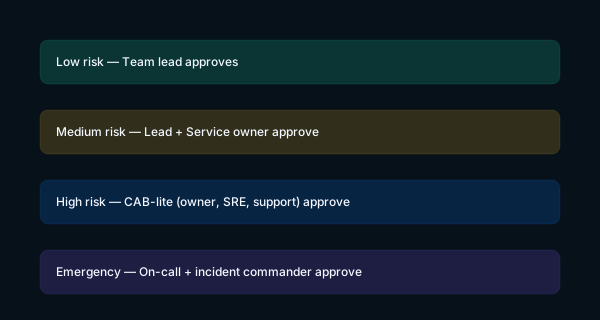
Classify changes in three groups. Standard: routine, low‑risk changes within a window. Expedited: riskier or time‑bound changes with extra comms and sign‑off. Emergency: active customer impact; the on-call engineer and incident commander approve immediate mitigation, followed by a review.
Fields to Include in a Change Plan
- Summary: one line users would understand.
- Owner / approver: who runs it and who signs.
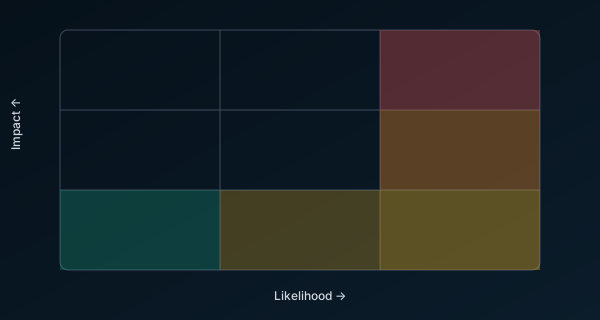
- Risk level: low/medium/high/emergency (see matrix).
- Blast radius: systems, customers, and data touched.
- Rollout steps: numbered, reversible actions.
- Backout plan: specific trigger and steps to undo.
- Change window: date, time, and freeze conflicts.
- Communication plan: who to tell, when, and how.
- Success criteria: telemetry or checks that prove steady state.
- Evidence: links to PRs, tickets, dashboards.
Risk Classification and Gates
Classify by impact and likelihood. Gate approvals, comms, and backout triggers by tier. Record any limits on rollback when assessing the risk.
Choosing Approvers
Name the reviewers needed for the change: the service owner, an SRE or senior engineer, and support or customer success for high‑risk changes. Capture names before the window opens.
Communication Playbook
Use short, factual messages. Name impact and next step. Link to status/details.
- Pre‑announce: “We will upgrade payments on Tue 19:00–19:30 UTC. Brief reads‑only risk. No customer impact expected.”
- Go‑live: “Change started 19:02 UTC. Monitoring latency and error rate. Next update 15 min or sooner.”
- Rollback: “Rolled back at trigger (p95 latency > 800ms for 5 min). Investigating cause. No data loss.”
- Steady state: “Change complete. Metrics normal for 30 min. Closing change.”
Filled Example: Zero‑Downtime DB Migration
Summary: Move primary database from v12 to v14 using logical replication; cut over with read‑only window < 60s. Risk: medium (read latency spikes possible). Backout trigger: p95 > 800ms for 5 min or error rate > 1%. Backout: demote new primary, re‑point app to old primary, disable write path until metrics normalize.
- Warm up a v14 replica and sync via logical replication.
- Health checks green on both clusters; freeze writes for 60s.
- Promote v14; point writes to new primary; re‑enable writes.
- Monitor latency/error dashboards; lift freeze after 30 min stable.
FAQ
Do we need a CAB? You need accountable approvals. Assign named reviewers with authority to approve or stop the change.
How strict should the backout trigger be? Strict enough that an on‑call engineer can act without debate. Use objective metrics and a short window.
Where do templates live? In the same repo as the service, reviewed like code, and linked from the PR that ships the change. If your team needs an engineering partner for database migrations, zero-downtime cutovers, or ongoing release management, see our application management and operations service.